

Artificial intelligence (AI) is a general term covering a wide spectrum of technologies and techniques that allow machines to learn from data and make decisions without human intervention.
Have you ever wondered how artificial intelligence can improve the WordPress website design process? If so, you’ve come to the right place. In this article, we’ll explore the potential of artificial intelligence to enhance the web design process and how it can help make a website more professional and attractive. So let’s dive right in!
How can artificial intelligence help with WordPress website design?
Artificial intelligence has revolutionized the way we write. You’ll use it, for example, to generate an introduction to an article without human input. Artificial intelligence-based copywriting tools, such as chat.openai.com or rytr.me, are able to tune into a suggested set of keywords and use them to create an engaging and relevant article, tailored to a specific topic.
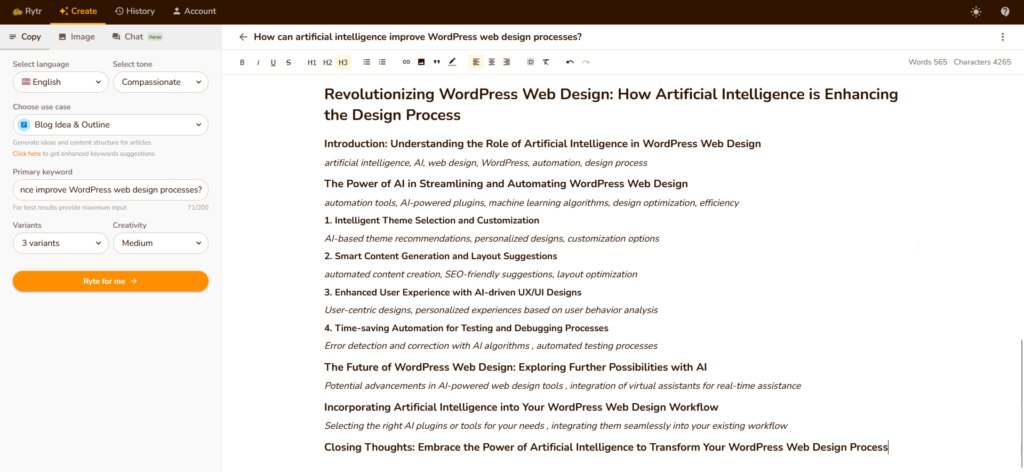
AI tools use natural language processing algorithms to understand context and generate content that is both informative and interesting. What’s more, AI-assisted writing assistants can help you save time by suggesting ideas for introductions and providing feedback on text quality. Artificial intelligence technology is becoming more and more advanced, and it’s only a matter of time before AI-generated texts become widespread.
In WordPress, you’ll use AI to create dedicated graphics from scratch, such as for distinctive images for WordPress articles, or to enhance existing images and videos. Dedicated tools available from Canva or labs.openai.com, for example, are becoming more powerful and accessible, making it easier for designers to create stunning visual effects. It is worth noting that AI tools work best as accelerators, not replacements. A designer who knows how to prompt AI tools effectively can produce in hours what previously took days — but the output still benefits from human judgment on brand fit, usability, and context. The practical takeaway: AI handles the repetitive and the generative, while your team focuses on decisions that require business context.
Artificial intelligence is becoming increasingly important in the world of web design, especially when it comes to designing WordPress sites. With AI, you’ll be able to automate tasks that previously required manual coding, allowing you to streamline your workflow and increase the speed of web development.
AI-based web design tools will help you create beautiful, responsive and functional websites with minimal effort and time. They will come in handy when optimizing sites for search engines (SEO), provide accurate analytics and automate mundane tasks like content creation.
In addition, AI plugins, such as AI Wo Plugin, can be used to improve the overall performance of a WordPress site by optimizing images, improving page load speed and providing analytics on user behaviour. With powerful AI tools at your disposal, you can easily create stunning websites that look excellent on all devices.
Leveraging artificial intelligence to improve SEO in WordPress
As the Internet continues to evolve, it is becoming increasingly important for companies to understand how to use artificial intelligence (AI) to improve SEO on WordPress. AI can help companies make sure their content is optimized for search engine algorithms, as well as provide insights into their site’s performance.
Artificial intelligence will support you with keyword research and help you find the most effective words and phrases for your content. By using artificial intelligence, companies can make sure they are taking full advantage of all the SEO capabilities available in WordPress. For example, artificial intelligence can be used to identify keywords that are likely to increase traffic and conversions from search engines. In addition, artificial intelligence can be used to optimize images and videos for better visibility on search engine results pages (SERPs). With AI tools, you will maximize your SEO potential of WordPress and increase your chances of online success.
In practice, AI-assisted SEO in WordPress today covers several specific areas worth knowing about:
Content optimization. Plugins like Rank Math Content AI or SEOPress analyze your draft and suggest improvements to keyword usage, heading structure, readability score, and internal linking — all within the WordPress editor, without switching between tools.
Automated meta generation. Writing unique meta titles and descriptions for dozens or hundreds of pages is time-consuming and often skipped. AI can generate these in bulk based on the page content, ensuring every page has an optimized snippet before it hits the index.
Schema markup. Structured data helps search engines understand your content and display rich snippets (star ratings, FAQs, product prices) in search results. AI tools can generate and insert the correct schema automatically, which previously required manual coding or a developer.
Content gap analysis. AI can compare your existing content against top-ranking pages for a given keyword and identify topics you haven’t covered — giving you a clear editorial roadmap rather than guesswork.
The result is a site that ranks more consistently across a broader set of keywords, without requiring a dedicated SEO specialist to review every piece of content manually.

How can artificial intelligence help you reach a larger audience and generate more revenue from your WordPress site?
Artificial intelligence is revolutionizing the way companies reach their audiences and generate more revenue from their WordPress sites. Using AI, you will create more personalized content, automate marketing processes and optimize site performance to maximize conversions.
Artificial intelligence helps in analyzing user behavior and providing valuable information on the best strategies for targeting ads to different audiences. This allows you to reach more people with relevant content and increase your chances of generating higher revenues from your site. For example, AI-based tools can be used to identify customer segments with the highest conversion potential and target them with relevant offers.
On the other hand, AI-based chatbots can be used to provide personalized customer service 24/7 and help build relationships with potential customers in order to increase sales. With AI, you’ll be able to reach a larger audience and generate more revenue from your WordPress site than ever before!
A few concrete examples of where this plays out for WordPress-based businesses:
Personalized product recommendations. For WooCommerce stores, AI plugins can analyze purchase history and browsing behavior to show each visitor products most likely to result in a conversion — the same logic that powers recommendation engines on large e-commerce platforms, now accessible to smaller stores.
Dynamic pricing and promotion targeting. AI can identify which customer segments respond to discounts versus urgency-based messaging (limited stock, countdown timers) and adjust what each visitor sees accordingly.
Automated email segmentation. Tools integrated with WordPress and your email platform can segment subscribers based on behavior — pages visited, products viewed, forms submitted — and trigger relevant follow-up sequences automatically. This replaces manual list management with a system that runs in the background.
Conversion rate optimization. AI-powered A/B testing tools (such as those integrated with Google Optimize or native WordPress plugins) can run multiple page variants simultaneously, automatically allocate traffic to the better-performing version, and report results — without manual setup for each test.
These are not future possibilities. They are available today, largely through plugins and integrations that connect to WordPress without custom development.
Summary
Artificial intelligence is not replacing web designers or WordPress developers — it is changing what they spend their time on. The repetitive, generative, and analytical parts of the process are increasingly handled by AI: content drafts, image generation, keyword research, meta descriptions, schema markup, A/B testing, and customer segmentation.
What remains firmly in human hands is strategic judgment: understanding what a business actually needs, how a site should communicate with its specific audience, and when the AI output is good enough versus when it misses the mark.
For WordPress specifically, the barrier to using AI tools has dropped significantly. Most of the capabilities described in this article are accessible through plugins or SaaS tools with WordPress integrations — without writing a line of code. The practical question is no longer whether to use AI in your WordPress workflow, but which tools solve your actual bottlenecks.
FAQ
1. What AI tools work best for WordPress web design?
It depends on the task. For content generation, AI Engine (a WordPress plugin) connects directly to OpenAI, Claude, or Gemini models and lets you generate or edit content from within the WordPress editor. For SEO, Rank Math Content AI and SEOPress both offer AI-assisted optimization. For image generation, Canva’s AI tools and DALL-E (via labs.openai.com) are widely used. For customer service automation, Tidio’s Lyro AI agent integrates directly with WordPress and WooCommerce. There is no single tool that covers everything — the practical approach is to pick tools that address your specific bottlenecks rather than install as many AI plugins as possible.
2. Can AI replace a web designer?
Not in any meaningful sense. AI tools can generate layouts, suggest color palettes, write copy, and produce images — but they do so without understanding your business, your audience, or your brand positioning. A web designer’s core value is judgment: knowing when a design works for a specific context, how users will actually navigate it, and what needs to change. AI accelerates the execution of design work significantly. It does not replace the thinking that makes design effective.
3. How does AI improve SEO in WordPress?
AI supports WordPress SEO in several practical ways: generating and optimizing meta titles and descriptions, suggesting internal links, identifying content gaps compared to competing pages, automating schema markup for rich snippets, and analyzing keyword density and readability in real time. Plugins like Rank Math Content AI and SEOPress handle most of this directly in the WordPress editor. The result is that content is more consistently optimized across the entire site — not just on pages that someone manually reviewed.
4. Is AI in WordPress suitable for non-technical users?
Yes, for most use cases. The AI tools available as WordPress plugins — content generators, SEO assistants, chatbots, image tools — are designed to work through visual interfaces without requiring any coding knowledge. You install a plugin, connect an API key if needed, and use the feature from within your existing WordPress dashboard. The more technically complex AI applications (custom model training, API integrations, dynamic pricing systems) still require developer involvement, but these represent a small fraction of what’s available to the average WordPress site owner.