

TL;DR Product configurators are interactive tools that let customers customize products in real-time with instant visual feedback and pricing. Available as 2D configurators (efficient, starting at $15k-35k) or 3D configurators (immersive, starting at $80k+). Best for furniture, manufacturing, window coverings, and custom products. Reduces returns 25-30% and increases conversion rates 1.5-2×. Implementation takes 2-5 months. Integrates with Shopify, WooCommerce, and Magento. Custom solutions are needed when dealing with complex pricing rules, unique workflows, or specific integration requirements that standard plugins can’t handle.
The furniture industry loses an estimated $3-5 million annually in returns, with 22% of customers citing “it looked different than I expected” as their reason. For businesses selling customizable products, this gap between customer expectation and reality isn’t just frustrating—it’s expensive.
Product configurators bridge this gap by letting customers see exactly what they’re buying before they commit. Whether you’re selling custom furniture, industrial equipment, or specialty materials, a well-built configurator transforms uncertainty into confidence, browsers into buyers, and reduces costly returns by up to 30%.
This guide covers everything you need to know about product configurators: what they are, how they work, when you need one, and what to expect during implementation.
This is the first part of our guide to configurators. In part 2, we will discuss prices and technical details.
What is a product configurator?
A product configurator is an interactive software tool that allows customers to customize products in real-time while seeing visual feedback of their choices and receiving instant pricing updates. Instead of browsing through hundreds of preconfigured product listings, customers build their ideal product step by step, making decisions about dimensions, materials, colors, and features as they go.
Product configurator–definition and core purpose
A product configurator serves three essential functions:
Visual feedback: As customers select options, they immediately see how their choices affect the product’s appearance. Whether through 2D images or 3D models, the configurator shows exactly what the finished product will look like.
Pricing transparency: Every selection updates the price in real-time. Customers understand exactly how their choices impact cost, eliminating surprise at checkout.
Specification accuracy: The configurator captures every detail of the customer’s configuration and sends complete specifications to your order management and production systems, reducing errors and customer service inquiries.
How it works: the customer perspective
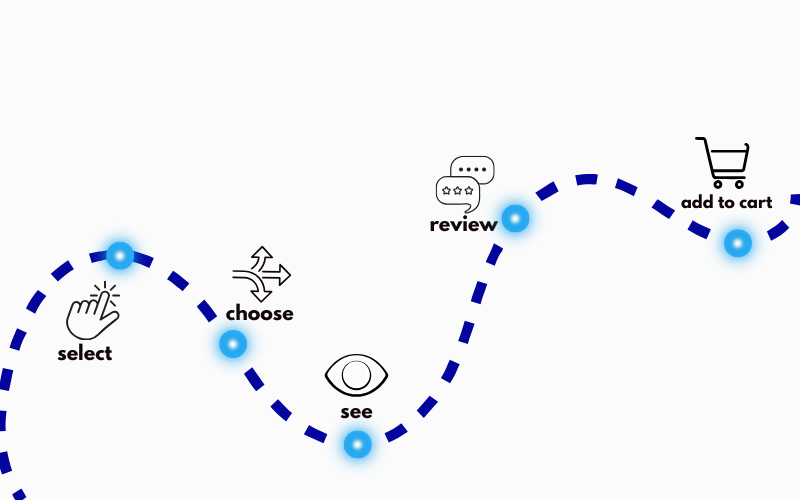
From a customer’s viewpoint, using a product configurator follows a straightforward path:
- Select a base product – start with a category or product type (sofa, table, window blind, etc.)
- Choose customization options – make selections for color, material, dimensions, finishes, and any other variable parameters
- See changes in real-time – watch the product image or 3D model update instantly with each choice
- Review pricing – see the total price adjust automatically based on selections
- Add to cart – once satisfied, add the configured product with all specifications included
The entire process feels natural and intuitive—like building something in the real world, but without the limitations of physical samples or showroom space.
Behind the scenes: technical components
While the customer experience appears simple, several systems work together behind the scenes:
Rules engine: this validates which combinations are possible. Can oak wood pair with a matte black finish? Does selecting extra-wide dimensions exclude certain leg styles? The rules engine enforces these business logic constraints, preventing customers from selecting invalid combinations.
Pricing calculator: more sophisticated than simple addition, this handles complex pricing logic including volume discounts, premium material upcharges, size-based calculations, and conditional pricing where one choice affects the cost of another.
Visual renderer: whether 2D or 3D, this system generates the images customers sees in real life. For 2D configurators, it swaps between pre-prepared photos. For 3D configurators, it renders materials and geometries in real-time.
Integration layer: this connects the configurator to your e-commerce platform, sending the complete product specification to your shopping cart, order management system, and potentially your ERP or production systems.
Types of product configurators
Product configurators come in two primary types, each suited to different products, budgets, and business needs. Understanding the difference helps you make the right choice for your specific situation.
2D product configurators
2D product configurators use high-quality photographs that change as customers make selections. When someone chooses a different fabric color, the system swaps to a photo showing that fabric. When they select a different leg style, another photo appears.
How 2D product configurators work
2D configurators rely on a library of pre-photographed images. Each combination of major options requires its own photo. The system displays the appropriate image based on customer selections, creating the illusion of customization while actually showing static photos.
Best applications:
2D configurators excel for products where a three-dimensional perspective isn’t critical to the buying decision:
- Window coverings (blinds, shutters, shades) where exact measurements matter more than viewing from different angles.
- Signs, labels, and printed materials where the design is inherently flat.
- Products with straightforward customization where customers primarily care about color and basic options.
- Any situation where 3D visualization doesn’t add significant value to the customer experience.
Advantages of 2D configurators
Faster implementation: without the need for 3D modeling, 2D configurators typically launch in 4-8 weeks, roughly half the time of 3D implementations.
Lower initial investment: starting around $15,000-35,000, 2D configurators cost significantly less than 3D alternatives, making them accessible for smaller businesses or those testing the configurator concept.
Simpler maintenance: adding new options requires new photography but no 3D modeling expertise. Most businesses can handle this internally.
Superior mobile performance: 2D images load quickly even on slower connections, crucial since 60-70% of e-commerce traffic comes from mobile devices.
Limitations of 2D configurators
Photography requirements: each significant option combination needs its own photo. A product with 10 colors × 5 styles = 50 photos minimum.
Limited interactivity: customers see only the predetermined angles and perspectives captured during photography.
Scaling challenges: as option count grows, the number of required photos increases exponentially, becoming difficult to manage.
Real example: PlasticExpress
PlasticExpress, Poland’s first online configurator for custom plastic products, demonstrates 2D configurators perfectly. Customers design custom plexiglass shapes by:
- selecting material type and thickness,
- drawing or choosing predefined shapes,
- specifying exact dimensions,
- adding cutouts, holes, or rounded corners,
- seeing real-time pricing per square meter.
The configurator generates an SVG file automatically sent to production systems, eliminating manual order processing entirely. While the visualization is 2D (showing the shape from above), this perfectly suits the product since customers primarily care about dimensions and shape accuracy, not three-dimensional perspective.
Implementation took approximately 3 months and included the full e-commerce platform, demonstrating how 2D configurators can handle sophisticated logic (complex shape calculations, dynamic pricing) without requiring 3D rendering.
3D product configurators
3D product configurators render products in three dimensions, allowing customers to rotate, zoom, and inspect from any angle. Materials appear photorealistic, showing texture, reflection, and how different fabrics or finishes actually look on the product.
How 3D product configurators work
3D configurators use digital models of products, typically created in software like Blender, 3ds Max, or specialized furniture modeling tools. When customers make selections, the system applies different materials, textures, or geometries to the 3D model and renders it in real-time in the browser.
Best applications:
3D configurators provide the most value for products where spatial understanding matters:
- Furniture (sofas, tables, chairs, storage systems) where customers need to see how components fit together
- Footwear with material combinations where texture and how materials meet at seams matters
- Complex assembled products with multiple components
- High-value purchases where the immersive experience justifies the higher investment
- Products where viewing from multiple angles significantly reduces purchase uncertainty
Advantages of 3D configurators
Immersive experience: customers can inspect products from every angle, zoom in on details, and see exactly how materials look in different lighting conditions.
Better for complex products: products with many interconnected parts (modular furniture, assembled equipment) are much easier to understand in 3D.
Premium brand positioning: the sophisticated technology signals quality and innovation, supporting premium pricing.
Reduced expectation gap: Customers develop a much more accurate mental model of what they’re buying, significantly reducing “not what I expected” returns.
Limitations of 3D configurators
Longer implementation timeline: creating 3D models, optimizing performance, and ensuring mobile compatibility typically requires 12-16 weeks minimum.
Higher investment: starting around $80,000-200,000+ depending on complexity, 3D configurators require significant upfront investment.
3D modeling requirement: if you don’t have 3D models of your products, creating them adds $50,000-100,000+, depending on quantity and detail level.
Technical complexity: ensuring smooth performance across devices, especially mobile, requires careful optimization and ongoing maintenance.

Real example: industrial metal furniture
For a manufacturer of industrial metal furniture and shelving systems—the kind used in warehouses, workshops, and commercial spaces where function matters more than aesthetics—we built a 3D configurator handling:
- Tables, chairs, and shelving units in multiple base configurations
- Metal frame options (various finishes and thicknesses)
- Wood top options (different wood types, thicknesses, and edge treatments)
- Dimensional customization (length, width, height within valid ranges)
- Leg style variations and thickness options
The 3D visualization proved essential because customers needed to see how metal frames paired with wood tops, how different leg styles affected overall appearance, and how dimensions changed proportions. These spatial relationships are nearly impossible to convey through 2D images alone.
Comparison: 2D vs. 3D configurators
| Feature | 2D Configurator | 3D Configurator |
| Implementation timeline | 4-8 weeks typical | 12-16 weeks typical |
| Starting investment | $15,000-35,000 | $80,000-200,000+ |
| Best for | Flat products, simple customization | Complex spatial products |
| Mobile performance | Excellent (fast loading) | Good (requires optimization) |
| Visual impact | Good (clear, photo-quality) | Excellent (immersive, interactive) |
| Maintenance | Easier (photography-based) | More complex (3D expertise) |
| Customer perception | Professional, clear | Premium, innovative |
| Scaling | Challenging (photo count grows) | Easier (modify digital models) |
The choice isn’t about which is “better”—it’s about which fits your products, customers, and business model. Many successful e-commerce businesses use 2D configurators and see excellent results because they matched the tool to their specific needs.
Why businesses need product configurators
Product configurators solve specific, expensive problems that plague businesses selling customizable products. Understanding these pain points helps clarify whether a configurator makes sense for your business.
Problem 1: return rates crushing profit margins
The furniture and home decor industry experiences return rates between 18-25% for customizable products, significantly higher than the 8-10% average for standard e-commerce. The number one reason cited? “It looked different than I expected.”
The real cost:
For a mid-size furniture brand doing $50 million annually with a 20% return rate:
- $10 million in returned merchandise
- $3-4 million in actual losses (reverse logistics, restocking, damaged items, disposal)
- Opportunity cost of tying up inventory
- Staff time processing returns and managing customer disappointment
How configurators help
Visual configurators reduce this expectation gap dramatically. When customers see a realistic representation of exactly what they’re buying—in their chosen fabric, finish, and dimensions—the surprise factor disappears. Our clients typically see return rates drop 25-30% within six months of implementing configurators, translating to millions in saved costs for larger operations.
Problem 2: cart abandonment on customizable products
Standard e-commerce products see roughly 65% cart abandonment. Customizable products without configurators see 75-80% abandonment. The difference? Uncertainty.
Why it happens
When customers can’t visualize their customization choices, doubt creeps in:
- “Will this color actually match my decor?”
- “How will this look in my space?”
- “Am I choosing the right combination?”
- “What if it looks different than I imagine?”
This uncertainty creates friction. Faced with a $2,000-5,000 purchase they can’t fully picture, customers abandon carts, often to visit competitors with better visualization.
How configurators help
Interactive visualization removes doubt. Customers see their exact choices, gaining confidence to complete the purchase. The impact shows clearly in conversion rate data:
- Standard product pages: 2-3% conversion
- Customizable products without a configurator: 1-1.5% conversion
- Customizable products with configurator: 2.5-4% conversion
That difference—from 1.5% to 3%—literally doubles revenue from the same traffic.
Problem 3: content production bottleneck
Traditional product photography for customizable products creates an impossible scaling problem. Consider:
A furniture line with:
- 20 base products
- 15 fabric options per product
- 5 leg style options
- 3 cushion configurations
That’s 20 × 15 × 5 × 3 = 4,500 potential combinations. Even photographing just one angle of each combination at $200 per shoot = $900,000. And that’s before considering that furniture photography with proper styling and lighting typically costs $1,500-2,000 per product shoot.
The real-world constraint
Most businesses photograph only a fraction of available combinations, forcing customers to imagine how unchosen options look. Professional product photography also takes time—8-12 weeks from planning to final images. This delay impacts speed to market for new colors, materials, or product variations.
How configurators help
3D configurators eliminate repeated photoshoots. Create the 3D model once, and generating different materials, colors, or configurations happens digitally in minutes. Launch a new fabric color tomorrow morning without waiting for photography. Test new product variations without committing to expensive shoots.
The initial investment in 3D modeling pays back quickly when you consider the accumulated cost of years of product photography.
Problem 4: customer service overwhelmed with configuration questions
For businesses selling customizable products, 30-40% of customer service tickets relate to product options:
- “Can I get the oak table with metal legs?”
- “Does this fabric come in blue?”
- “What’s the price difference between standard and premium leather?”
- “Do you have this in a larger size?”
The hidden cost
A customer service team handling 500 tickets monthly with 35% being configuration questions = 175 configuration tickets. At 15 minutes average handling time, that’s 44 hours monthly, roughly one full-time employee doing nothing but answering “Can I get X with Y?” questions.
For larger operations, this easily becomes 4-5 full-time equivalents at $50,000-60,000 per employee = $250,000+ annually answering questions a configurator would answer visually and instantly.
How configurators help
A well-designed configurator answers these questions before customers need to ask. The interface shows available options, updates pricing dynamically, and prevents invalid combinations. Configuration questions drop by 40-60% within months of launch, freeing your support team to handle issues that actually require human judgment and empathy.

Problem 5: competitive disadvantage in customer experience
Direct-to-consumer furniture brands have raised customer expectations dramatically. Companies with sophisticated 3D configurators create immersive shopping experiences that make traditional static product pages feel dated.
The perception problem:
When customers browse a competitor’s site and experience:
- Rotating 3D models
- Real-time material swapping
- Zoom functionality to inspect details
- Virtual room placement
Then visit your site and see:
- Static product photos
- Dropdown menus
- Generic descriptions
- “Contact us for custom options”
The perception gap is significant. Your products might be higher quality, but the experience suggests the opposite.
Brand positioning impact
Beyond direct comparisons, configurator quality signals brand sophistication. Premium brands need premium experiences. A clunky or missing configurator undermines your positioning and makes it harder to justify premium pricing.
Younger customers—millennials and Gen Z—particularly expect this level of digital sophistication. They grew up with interactive technology and have little patience for experiences that feel outdated.
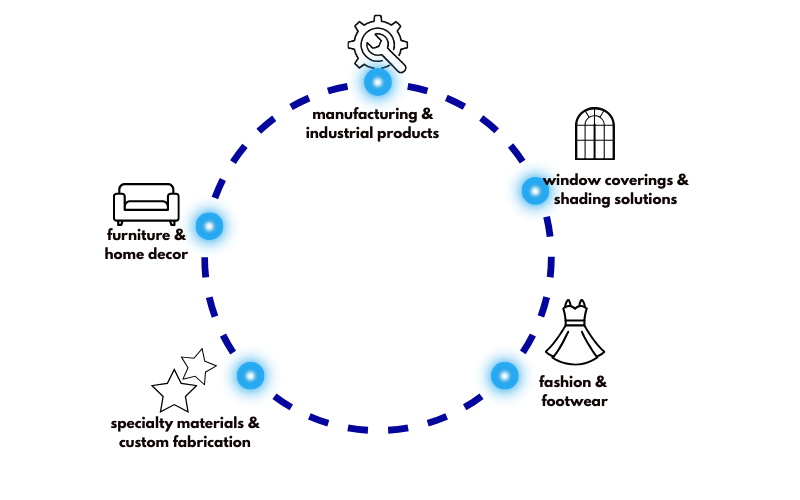
Industries that benefit most from product configurators
While product configurators can work for any business selling customizable products, certain industries see particularly strong returns on investment.
Furniture and home decor
Custom furniture represents the ideal configurator use case. Products are:
- High-value purchases (justifying the technology investment)
- Highly visual (customers need to see what they’re buying)
- Complex (many options and combinations)
- Difficult to return (large, heavy items with high reverse logistics costs)
Furniture businesses using configurators typically configure:
- Dimensions (length, width, height within valid ranges)
- Materials (wood types, metal finishes, fabric choices)
- Colors and finishes (stains, paints, textures)
- Component options (leg styles, drawer configurations, hardware)
- Upholstery details (cushion firmness, stitching, piping)
The metal furniture project mentioned earlier exemplifies this: industrial tables and shelving where customers specify dimensions, choose between metal and wood components, select finishes, and pick leg styles. The 3D configurator proved essential because customers needed to see how metal frames paired with wood tops and how proportions changed with different dimensions.
Window coverings and shading solutions
Blinds, shutters, and window treatments require exact measurements and come in countless combinations of materials, colors, and operating mechanisms. The complexity isn’t in the 3D visualization—the products are relatively flat—but in handling:
- Precise dimension requirements (millimeter accuracy)
- Material options (wood, faux wood, vinyl, fabric, aluminum)
- Color choices (50-100+ options common)
- Operating systems (cordless, motorized, traditional cords)
- Mounting options (inside mount, outside mount, ceiling mount)
2D configurators handle this perfectly. Customers see their chosen color and material clearly, specify exact dimensions, and receive accurate pricing instantly. The efficiency gains from eliminating back-and-forth measurement consultations alone justify the investment.
Manufacturing and industrial products
Companies producing custom machinery parts, made-to-order components, or configurable industrial equipment benefit significantly from configurators, though the customer experience differs from consumer-focused implementations.
Manufacturing configurators typically:
- Handle complex technical specifications
- Include engineering constraints in the rules engine
- Generate technical drawings or CAD files automatically
- Integrate directly with production systems
- Focus on specification accuracy over aesthetic appeal
The configurator becomes both a sales tool and the front end of the manufacturing process. When a customer completes their configuration, the system can generate CNC machine instructions, cutting lists, or assembly diagrams automatically.
Fashion and footwear
Custom shoes, bags, and accessories with material customization options benefit from configurators, particularly 3D implementations that show:
- How different materials look together
- Texture and finish in realistic lighting
- How colors work in combination
- Details like stitching, hardware, and edges
The challenge in fashion configurators is achieving photo-realistic material rendering. Leather, suede, fabric, and metal all need to look authentic. When done well, customers can confidently purchase without seeing physical samples.
Specialty materials and custom fabrication
Previously mentioned PlasticExpress demonstrates how configurators work for specialty materials. Customers design custom plexiglass products by:
- Selecting material type (clear, frosted, or colored acrylic in various thicknesses).
- Defining shapes (choosing from standards or drawing custom shapes).
- Specifying exact dimensions.
- Adding cutouts, holes, or rounded corners.
- Seeing real-time pricing calculated per square meter.
The configurator generates SVG files automatically sent to CNC cutting machines, eliminating manual order processing. This tight integration between customer configuration and production represents the ultimate efficiency: zero manual data entry, zero transcription errors, and instant production file generation.
The 2D visualization works perfectly here because customers care primarily about dimensions and shape accuracy, not three-dimensional perspective.
Frequently Asked Questions
1. Will a configurator slow down my website?
Not when built properly. A well-engineered configurator has minimal impact on website performance. 2D configurators typically have almost no performance impact since they’re swapping images that load quickly. 3D configurators require more resources but should still load and render smoothly when optimized correctly.
If a configurator is slowing your site, it’s built incorrectly. Performance should be verified during development and testing, not discovered after launch.
2. Can configurators integrate with my existing e-commerce platform?
Yes. We regularly integrate configurators with all major e-commerce platforms, including Shopify Plus, WooCommerce, Magento, BigCommerce, and custom platforms. The configurator captures the customer’s complete configuration and passes it to your shopping cart as a configured product.
From the customer perspective, the configurator feels like a natural part of your website. They configure their product, click “Add to Cart,” and proceed through your normal checkout process. They never know there’s a separate system involved.
The integration passes complete product specifications, including all selected options, the final calculated price, any custom inputs (dimensions, text personalization, etc.), and product visualization (screenshot or reference to the configured product). This data flows through your order management system so fulfillment teams receive complete information.
For more complex scenarios, we can integrate with ERP systems, manufacturing systems, inventory management tools, and other backend systems. These integrations ensure the configurator fits seamlessly into your existing business processes.
3. What if customers choose an invalid combination?
The rules engine prevents invalid combinations before they happen. You have three primary approaches:
Option disabling: When a customer selects Option A, any incompatible options become grayed out and unselectable. For example, selecting “Metal frame” might disable “Wood stain finish” since metal isn’t stained. This is the most common approach for straightforward incompatibilities.
Messaging with explanation: When attempting to select an incompatible option, a message clarifies why it’s not available: “Dark stain is not available with pine wood. Consider oak or maple for a dark stain, or select a light stain or natural finish with pine.” This educates customers about product constraints.
Auto-adjustment with notification: The system automatically adjusts to a valid combination and notifies the customer: “Changing to XL size has automatically updated leg style to Heavy Duty, as standard legs aren’t structurally sound for this size.” This prevents frustration from having to reconfigure.
Which approach works best depends on your products and customers. We typically recommend option disabling for simple incompatibilities, messaging for situations that benefit from explanation, and auto-adjustment sparingly for cases where the change is obvious.
The goal is preventing invalid orders while maintaining a smooth user experience. Customers should never feel blocked or confused by the rules engine.
4. Can I add new products or options after launch?
Absolutely. The admin panel is designed to allow adding products and options without developer involvement. Adding straightforward new options (a new fabric color, an additional size, a new finish) typically takes just minutes through the admin interface.
Adding entirely new product types depends on how different they are from existing products. If the new product uses similar option types and rules, you can often add it yourself. If it requires entirely different customization options or new business logic, developer support may be needed to extend the configurator’s capabilities.
